
Prepare GSTR-1
Check your outward supplies in the GSTR-1 report, save the JSON file and upload it on the GST portal yourself.
The GSTR-1 report lists your sales invoices and credit notes for the period. From the same screen you save a JSON file for the GST portal. Hisaab prepares the file. It does not upload it.
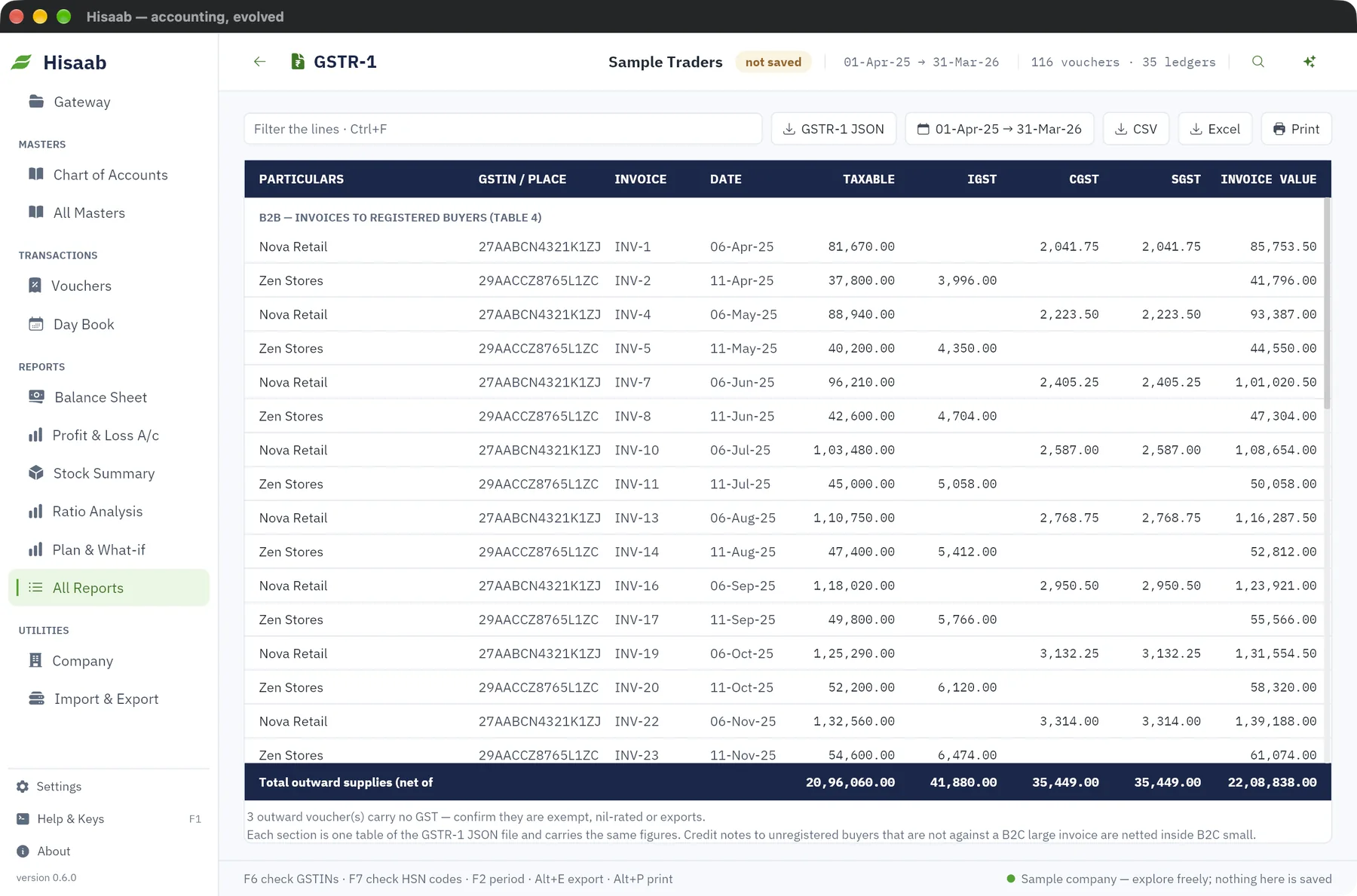
Open the report#
- Click All Reports in the sidebar, then GSTR-1 under GST.
- Press F2 and set the period to the return month, for example 1-Oct-2025 to 31-Oct-2025. The return period in the file is the month of the To date.
- Read the sections on screen.
The screen has one section for each table of the JSON file, in the same order and with the same figures.
| Section on screen | What it holds |
|---|---|
| B2B (table 4) | One row per invoice to a party that has a GSTIN. |
| B2C large (table 5) | One row per inter-state invoice to an unregistered buyer above the limit. |
| B2C small (table 7) | Totals by place of supply and rate, inter-state or intra-state, net of their credit notes. |
| Credit notes, registered buyers (table 9B) | One row per credit note to a party with a GSTIN, as positive figures. |
| Credit notes, unregistered buyers (table 9B) | One row per credit note against a B2C large invoice. |
| HSN summary (table 12) | Quantity, taxable value and tax for each HSN, unit code and rate. From the May 2025 period it is in two parts, B2B and B2C. |
| Documents issued (table 13) | For each number series: first and last number, issued, cancelled and net. |
Each section that has rows ends with its own total line, for example "Total B2B". An empty section says "none in this period". The last line, "Total outward supplies (net of credit notes)", is sales less credit notes for the period.
Press Enter on an invoice or credit note row to open the voucher. A row in red has a GSTIN that fails validation. A note at the foot counts invoices that carry no GST, so that you can confirm they are exempt, nil-rated or exports.
Save the JSON file#
- Click GSTR-1 JSON at the top of the report.
- The status bar shows where the file was saved. It goes to the
exportsfolder inside the Hisaab data folder.
What the file contains#
Only sections that have data are written. The section totals on screen agree with the file.
| Section in the file | Contents |
|---|---|
| B2B (table 4) | Invoices to registered buyers, rate-wise. |
| B2C Large (table 5) | Inter-state invoices to unregistered buyers with invoice value above ₹1,00,000. For return periods before August 2024 the limit is ₹2,50,000. |
| B2C Small (table 7) | All other sales to unregistered buyers, net of their credit notes, by place of supply and rate. |
| Credit notes, registered (table 9B) | Credit notes to parties with a GSTIN. |
| Credit notes, unregistered (table 9B) | Credit notes against a B2C Large invoice. Put the invoice number in the credit note's Reference so the two are matched. |
| HSN summary (table 12) | From the May 2025 period it is split into B2B and B2C. Before that it is one list. |
| Documents issued (table 13) | For each sales and credit note number series: first number, last number, total, cancelled and net issued. |
A Debit Note voucher in Hisaab is a purchase return, so it is not part of GSTR-1.
Upload it yourself#
- Log in to the GST portal.
- Go to Returns, then GSTR-1, then Prepare Offline, then Upload.
- Choose the file Hisaab saved.
- Check the figures the portal shows against the report before you file.
Careful: The file follows the published layout but has not been tested on the live portal. Have a tax practitioner check it before your first upload.
GSTR-3B and GSTR-2 reports#
- GSTR-3B shows outward taxable supplies, inward supplies under reverse charge, input tax credit available, and the tax payable in cash after credit is set off in the statutory order.
- GSTR-2 lists purchases and debit notes by supplier, registered and unregistered, and warns about input tax that cannot be matched to a valid GSTIN.
Both are reports to read, print or export as CSV or Excel. They have no JSON file.
Not yet#
- Direct upload to the portal. It is planned for paid plans and is not available now.
- Exports, SEZ and deemed-export supplies.
- Reverse-charge outward supplies and advances.
- The nil-rated and exempt table (table 8).
- Amendments and e-commerce tables.
Next#
Something here wrong or missing? Open a ticket and mention this page.