
From sale to cash
Take one credit sale from the customer's ledger to a GST invoice, send it, collect against the bill, clear it in the bank and see it in GSTR-1.
This guide is for whoever raises invoices and follows up payment. At the end, one sale will be invoiced, sent, collected, reconciled with the bank and visible in your sales, GST and receivables reports. The entries take about fifteen minutes.
Before you start#
- Your company has its GSTIN, State and Address with PIN code. See Set up GST.
- Each stock item has HSN / SAC and GST rate %. See Create stock items.
- You are signed in as Accountant or Admin.
The example#
Sample Traders, Pune, sells to Nova Retail, also in Maharashtra, on 30 days' credit.
| Item | Qty | Rate | Amount | GST | CGST | SGST |
|---|---|---|---|---|---|---|
| Basmati Rice 5kg | 100 bag | ₹520 | ₹52,000 | 5% | ₹1,300 | ₹1,300 |
| Steel Lunch Box | 50 pcs | ₹360 | ₹18,000 | 18% | ₹1,620 | ₹1,620 |
| Total | ₹70,000 | ₹2,920 | ₹2,920 |
Invoice value: ₹70,000 + ₹2,920 + ₹2,920 = ₹75,840. Both parties are in one state, so the tax is CGST and SGST, each half the rate.
Stage 1: Complete the customer's ledger#
- Click Chart of Accounts. Select the customer and click Alter, or click New ledger and put it under Sundry Debtors.
- Type the GSTIN. The mark shows valid and the state.
- Fill State (place of supply) if the customer has no GSTIN.
- Type
30in Credit period (days) and leave Track bill-by-bill on. - Fill Address with the town and PIN code on the last line, E-mail (for sending invoices) and Phone / WhatsApp.
- Press Ctrl+S.
Check: the ledger saves. An invalid GSTIN is refused.
Stage 2: Enter the sales invoice#
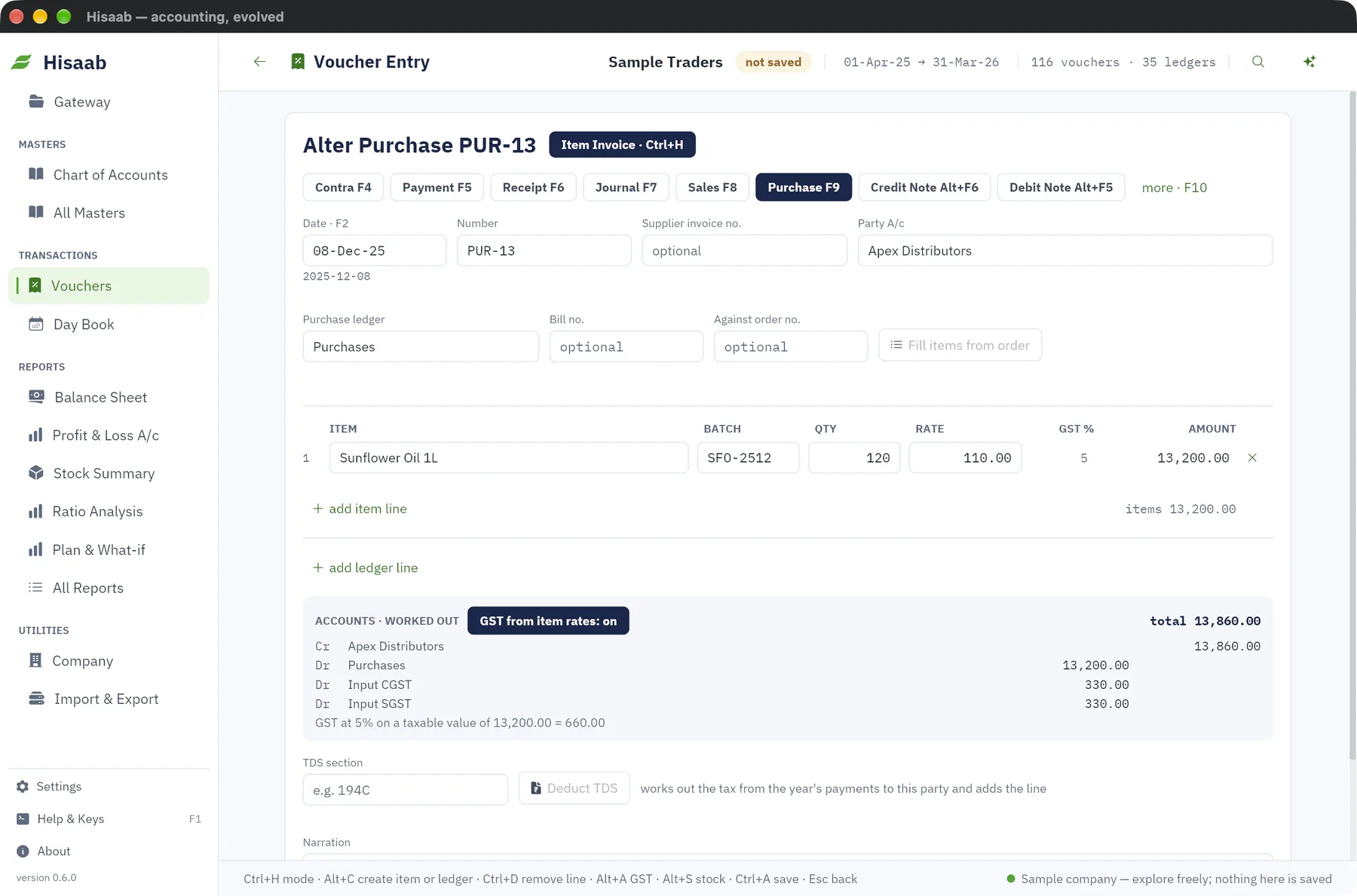
- Press F8. Type the Date, here
5-12-2025. - Leave Number blank. The box shows the number you will get, say
INV-31. - Type
Nova Retailin Party A/c and pick it. - Check the Sales ledger. It starts with the one you used last.
- Type the Item, Qty and Rate for the rice. Click add item line and enter the lunch boxes.
- Type a Narration and press Ctrl+S.
A Sales voucher opens in Item Invoice mode, so you do not type debits and credits. The Accounts · worked out box shows four lines as you type: Dr Nova Retail ₹75,840, Cr Sales ₹70,000, Cr Output CGST ₹2,920, Cr Output SGST ₹2,920. Add freight or round-off under Additional ledgers. Round-off is not automatic. If the chip beside the heading shows another mode, press Ctrl+H and choose Item Invoice.
Leave Bill no. beside the party blank. The bill then takes the invoice number, INV-31.
Check: the Accounts · worked out box shows a total of ₹75,840, and after saving the status bar shows the number.
Stage 3: Send the invoice#
- Press F10, select the invoice and press Enter.
- Click Print · Ctrl+P. The Tax Invoice opens in your browser. Print it, or choose "Save as PDF" there.
- Click WhatsApp. WhatsApp opens with a message giving the invoice number, date, amount and due date. Attach the PDF yourself, then press send.
- Or click E-mail. A draft opens in your mail program with the invoice attached as an HTML page. Attach the PDF yourself if the customer wants one.
Check: the due date in the message is 4-Jan-2026, the invoice date plus 30 days.
Stage 4: e-invoice and e-way bill, where they apply#
Ask your tax practitioner whether e-invoicing applies to you. An e-way bill is needed here because the consignment is above ₹50,000. Hisaab does not warn you about that limit.
- For the e-way bill, open All Masters, then Transport Details, and click New. Type
INV-31in Voucher number it applies to, then Distance (km) and Vehicle number. Save. - Open the invoice and click e-Way bill.
- Click e-Invoice.
- Each click saves a JSON file in the
exportsfolder. The status bar shows the path. - Log in to the e-invoice portal and the e-way bill portal yourself and upload each file.
Careful: Hisaab does not upload these files, and the IRN, QR code and e-way bill number do not come back into Hisaab. The printed invoice does not carry them. Keep the portal's signed copy. Neither file has been tested on the live portals, so have your tax practitioner check the first one.
Check: the status bar shows a file path. If it shows a reason instead, such as a missing PIN code or HSN, fix that and click again.
Stage 5: Record the receipt against the bill#
Nova Retail pays ₹75,840 by bank transfer on 2-Jan-2026.
- Press F6 and type the Date. A Receipt opens in Single Entry mode.
- Type the bank's transaction or cheque number in Reference. Statement matching uses it later.
- Type
HDFC Bankin Account. This is the account the money is received into. - Under Particulars type
Nova Retail, thenINV-31in Bill / centre, and75840in Amount. - Press Ctrl+S.
For a part payment, type the amount received. The rest stays pending on the bill. With the bill box blank, the oldest bills are settled first.
Check: open All Reports, then Bills Receivable. INV-31 is no longer listed under Nova Retail.
Stage 6: Clear it in the bank#
- Open All Reports, then Bank Reconciliation, and pick
HDFC Bankin Bank / cash ledger. - The receipt is under "Not yet reflected in the bank". Press Enter on it.
- In the Bank reconciliation box type the date the bank shows, here
3-1-2026, and click Mark cleared.
Or download the statement as CSV or Excel and drop the file on this report. Matching entries get their bank date from it.
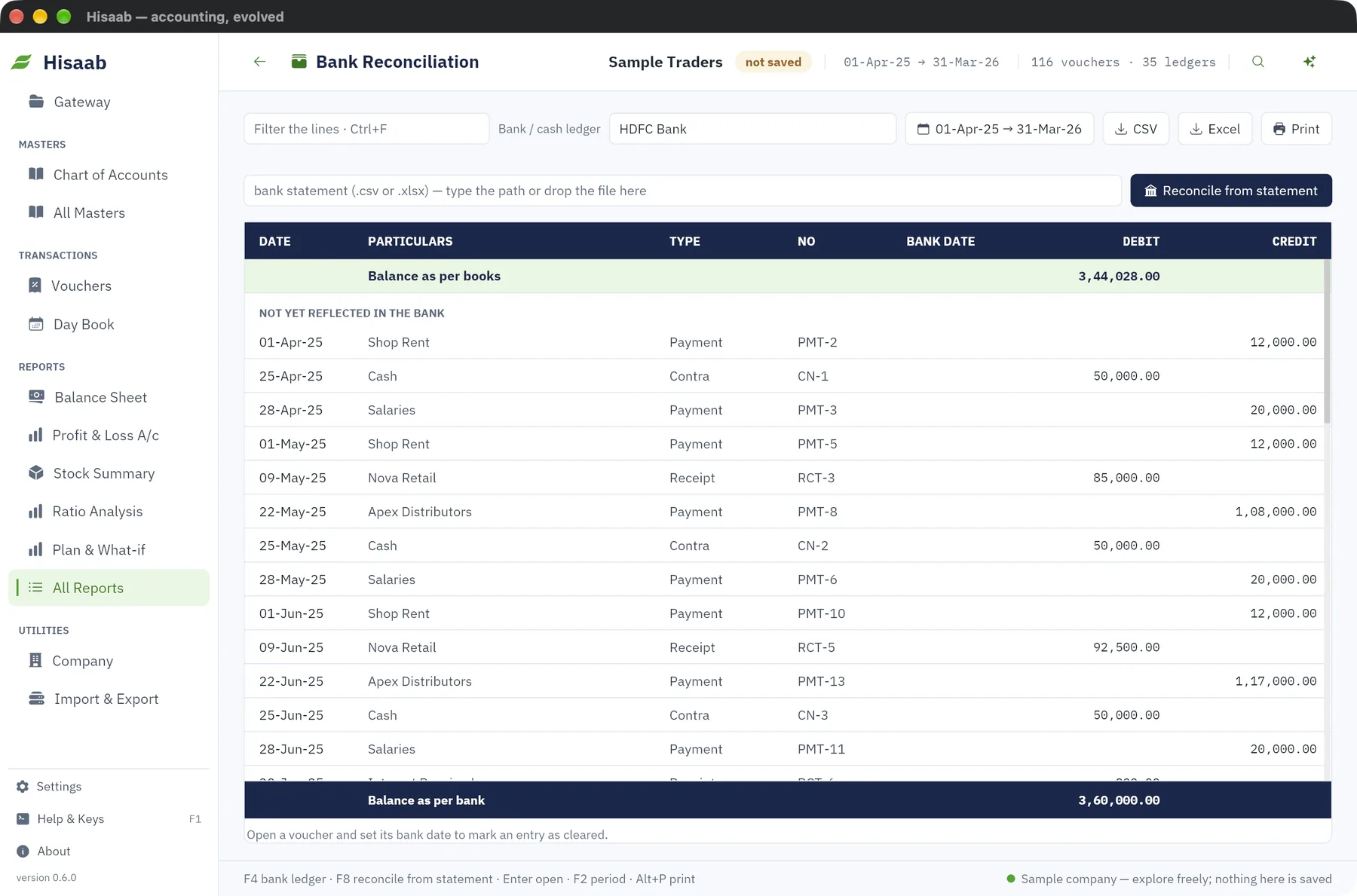
Check: the receipt has left the uncleared list, and the balance as per bank agrees with the statement.
Stage 7: See the sale in your reports#
| Report | How to open | What you should see |
|---|---|---|
| Sales Register | Shift+F8 | INV-31, Nova Retail, ₹75,840 |
| GSTR-1 | All Reports, period 1-Dec-2025 to 31-Dec-2025 | A B2B row with taxable ₹70,000, CGST ₹2,920, SGST ₹2,920, invoice value ₹75,840 |
| Receivables Ageing | All Reports | Nova Retail's total is lower by ₹75,840 after the receipt |
| Stock Summary | Sidebar | Outward up by 100 bags and 50 pcs |
Check: the GSTR-1 row agrees with the printed invoice to the rupee.
If something is off#
- CGST and SGST on a sale to another state. The customer's state is not known. Fill State (place of supply) on the ledger, then alter the invoice. The saved tax lines are kept under Additional ledgers, with GST from item rates: off. Remove those lines, click GST from item rates: off to switch it on, and check the Accounts · worked out box before you save. See Set up GST.
- The save is refused for the credit limit. The message gives the limit and the excess. Collect a payment first, or raise Credit limit on the ledger. It is a block, not a warning.
- The bill is still pending after the receipt. The bill number on the receipt does not match, so the amount sits as an "On account" line. Alter the receipt and type the invoice number. See Follow up receivables and payables.
- WhatsApp or E-mail reports a missing number or address. Add Phone / WhatsApp or the e-mail address on the customer's ledger.
- No e-invoice file. The status bar says why. See Make an e-invoice file.
Where to go next#
Something here wrong or missing? Open a ticket and mention this page.