
One GST month, books to portal
Check the books, save the GSTR-1 file, upload it on the GST portal yourself, match the portal's totals, work out GSTR-3B and post the tax payment.
This guide is for the person who prepares the monthly GST returns. At the end, GSTR-1 for one month will be uploaded and matched, the GSTR-3B figures worked out, and the tax payment in the books. Allow an hour. Hisaab prepares figures and one file. You do every upload and filing on the portal.
Careful: The GSTR-1 file follows the published layout but has not been tested on the live portal. Before your first filing, have your tax practitioner check the file and the GSTR-3B figures.
Before you start#
- GSTINs, tax ledgers and item rates are set up. See Set up GST.
- The month's sales and purchases are entered and no drafts are waiting. See Close the month.
- You have a login for the GST portal.
The example#
Sample Traders, Pune, for December 2025.
| Voucher | Party | Taxable | IGST | CGST | SGST |
|---|---|---|---|---|---|
Sales INV-31 |
Nova Retail, Maharashtra, registered | ₹70,000 | ₹2,920 | ₹2,920 | |
Sales INV-32 |
Zen Stores, Karnataka, registered | ₹36,000 | ₹6,480 | ||
Sales INV-33 |
Walk-in Customers, unregistered | ₹12,000 | ₹300 | ₹300 | |
| Output total | ₹1,18,000 | ₹6,480 | ₹3,220 | ₹3,220 | |
Purchase, bill APX/1187 |
Apex Distributors, registered | ₹84,000 | ₹2,100 | ₹2,100 |
Zen Stores is in another state, so INV-32 carries IGST: ₹36,000 × 18% = ₹6,480.
Stage 1: Check the books before you generate#
Hisaab writes the file without checking it, so make these checks yourself.
- GSTINs. Open All Reports, then GSTR-1, press F2 and set
1-12-2025to31-12-2025. A row in red has a GSTIN that fails validation. A registered customer under B2C has no GSTIN on the ledger. Correct the ledger. - HSN. In the HSN summary, an item without a code needs HSN / SAC filled on the stock item.
- Tax ledgers. Each must be under Duties & Taxes, with CGST, SGST or IGST and Output or Input in its name.
- Document series. Open Data Health from All Reports. Each type should read "unbroken sequence". A deleted invoice leaves a gap. A cancelled one keeps its number.
- Invoices without GST. A note at the foot of GSTR-1 counts them. Confirm each is exempt, nil-rated or an export.
- Supplier bills. Open GSTR-2. It warns about purchases with nothing in Supplier invoice no. and input tax from suppliers with no valid GSTIN.
Check: GSTR-1 has no red rows, every HSN line has a code, and Data Health shows no missing invoice numbers.
Stage 2: Read GSTR-1 on screen#
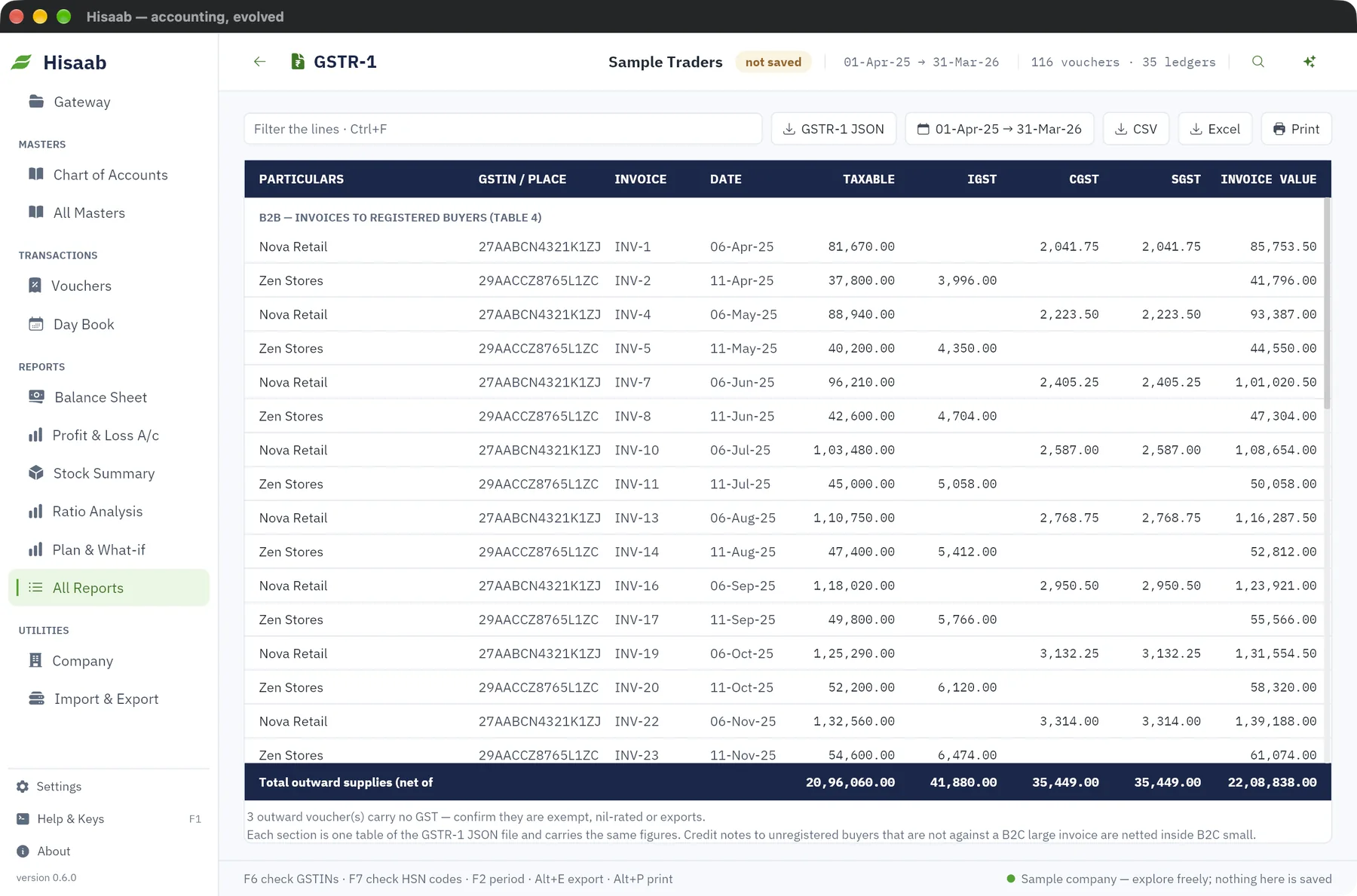
Each section on screen is one table of the file and carries the same figures.
| Section | In the example |
|---|---|
| B2B (table 4) | INV-31 and INV-32: taxable ₹1,06,000, IGST ₹6,480, CGST ₹2,920, SGST ₹2,920 |
| B2C small (table 7) | Maharashtra at 5%: taxable ₹12,000, CGST ₹300, SGST ₹300 |
| HSN summary (table 12) | 1006: ₹52,000. 7323: ₹54,000. 0902: ₹12,000 |
| Documents issued (table 13) | INV-31 to INV-33, 3 issued, 0 cancelled |
| Total outward supplies | Taxable ₹1,18,000, tax ₹12,920 |
The HSN lines add up: ₹52,000 + ₹54,000 + ₹12,000 = ₹1,18,000. The tax adds up: ₹6,480 + ₹3,220 + ₹3,220 = ₹12,920.
Check: press Shift+F8 for the Sales Register. The three invoice values, ₹75,840 + ₹42,480 + ₹12,600 = ₹1,30,920, equal taxable ₹1,18,000 plus tax ₹12,920.
Stage 3: Save the file#
- Click GSTR-1 JSON at the top of the report.
- The status bar shows the path of the file, in the
exportsfolder.
The return period in the file is the month of the To date. Only sections with data are written.
The file leaves out exports, SEZ supplies, reverse-charge outward supplies, advances, the nil-rated and exempt table, amendments and e-commerce tables. Add any of these on the portal by hand.
Check: the file name ends with the period you meant, 20251201-20251231.
Stage 4: Upload it yourself and match the totals#
- Log in to the GST portal.
- Go to Returns, then GSTR-1, then Prepare Offline, then Upload, and choose the file.
- Open the summary the portal shows and compare it table by table with the report: B2B, B2C, HSN and documents issued.
Check: taxable value and each tax head on the portal equal the report. File only after they agree.
Stage 5: Work out GSTR-3B#
- Open All Reports, then GSTR-3B, for the same period.
- Type the figures into the portal's GSTR-3B form. There is no file for GSTR-3B.
| Row | IGST | CGST | SGST |
|---|---|---|---|
| Tax liability | ₹6,480 | ₹3,220 | ₹3,220 |
| Paid through ITC | ₹2,100 | ₹2,100 | |
| Tax payable in cash | ₹6,480 | ₹1,120 | ₹1,120 |
Net GST payable in cash: ₹6,480 + ₹1,120 + ₹1,120 = ₹8,720. Credit is set off in the statutory order.
Note: The report works on this period's Sales, Purchase, Credit Note and Debit Note vouchers alone. It does not bring in credit carried forward from earlier months or your electronic credit ledger, and Hisaab cannot import or match GSTR-2B. Tick the GSTR-2 report against the portal's GSTR-2B by hand and adjust the credit before you file.
Check: tax liability in GSTR-3B equals the tax total in GSTR-1, ₹12,920.
Stage 6: Post the payment and lock the month#
Hisaab does not post these entries.
- Press F7 for a Journal dated
31-12-2025: Dr Output CGST ₹2,100, Cr Input CGST ₹2,100, Dr Output SGST ₹2,100, Cr Input SGST ₹2,100. - Press F5 for a Payment on the challan date: Dr Output IGST ₹6,480, Dr Output CGST ₹1,120, Dr Output SGST ₹1,120, Cr HDFC Bank ₹8,720.
- Press F3, type
31-12-2025in Lock books until (period lock) and click Save settings · Ctrl+S. Only an Admin can do this.
Check: the three Output ledgers return to nil. For CGST, ₹3,220 − ₹2,100 − ₹1,120 = 0. Altering a December invoice is now refused.
If something is off#
| What the portal or report shows | Cause in the books | Fix |
|---|---|---|
| A receiver's GSTIN is rejected | Wrong GSTIN on the party ledger, often from an import | Correct the ledger |
| HSN missing or invalid | Stock item has no HSN, or not 4, 6 or 8 digits | Fill HSN / SAC on the item |
| IGST where CGST and SGST were due, or the reverse | State (place of supply) blank or wrong on the party | Correct the ledger, alter the invoice and fill the accounts again |
| Totals lower than your sales | A sale is still a draft, or dated outside the period | Post the draft, check the period |
| A credit note to an unregistered buyer is in the wrong table | The original invoice number is not in the credit note's Reference | Alter the credit note and type it |
If the file itself is refused, see Prepare GSTR-1 and enter that month's figures on the portal by hand.
Where to go next#
Something here wrong or missing? Open a ticket and mention this page.