
Run payroll
Set up employees, check the month's salary sheet with PF, ESI and professional tax, post the payroll voucher and save the PF ECR file.
Payroll is worked out from the Employees, Attendance & Pay Adjustments and Payroll Settings masters. You check the month's Payroll Register, then post one journal.
Set up once#
- Posting ledgers. These must exist:
SalariesandEmployer PF & ESI Contributionunder Indirect Expenses,Salary Payable,PF PayableandESI Payableunder Current Liabilities,Professional Tax PayableandTDS on Salary Payableunder Duties & Taxes. The setup wizard creates them if you chose payroll. - Employees. Open All Masters, then Employees, and click New. Date of joining and Basic pay per month are required. Add HRA per month and Other allowances per month, and type Yes or No in Provident fund applies, ESI applies and Professional tax applies. Fill in State of employment and UAN.
Put basic plus dearness allowance in Basic pay per month. PF is worked out on it.
Each month#
- For leave without pay, overtime, a bonus or an advance to recover, open All Masters, then Attendance & Pay Adjustments, and add a record with the Employee and any date in the Month.
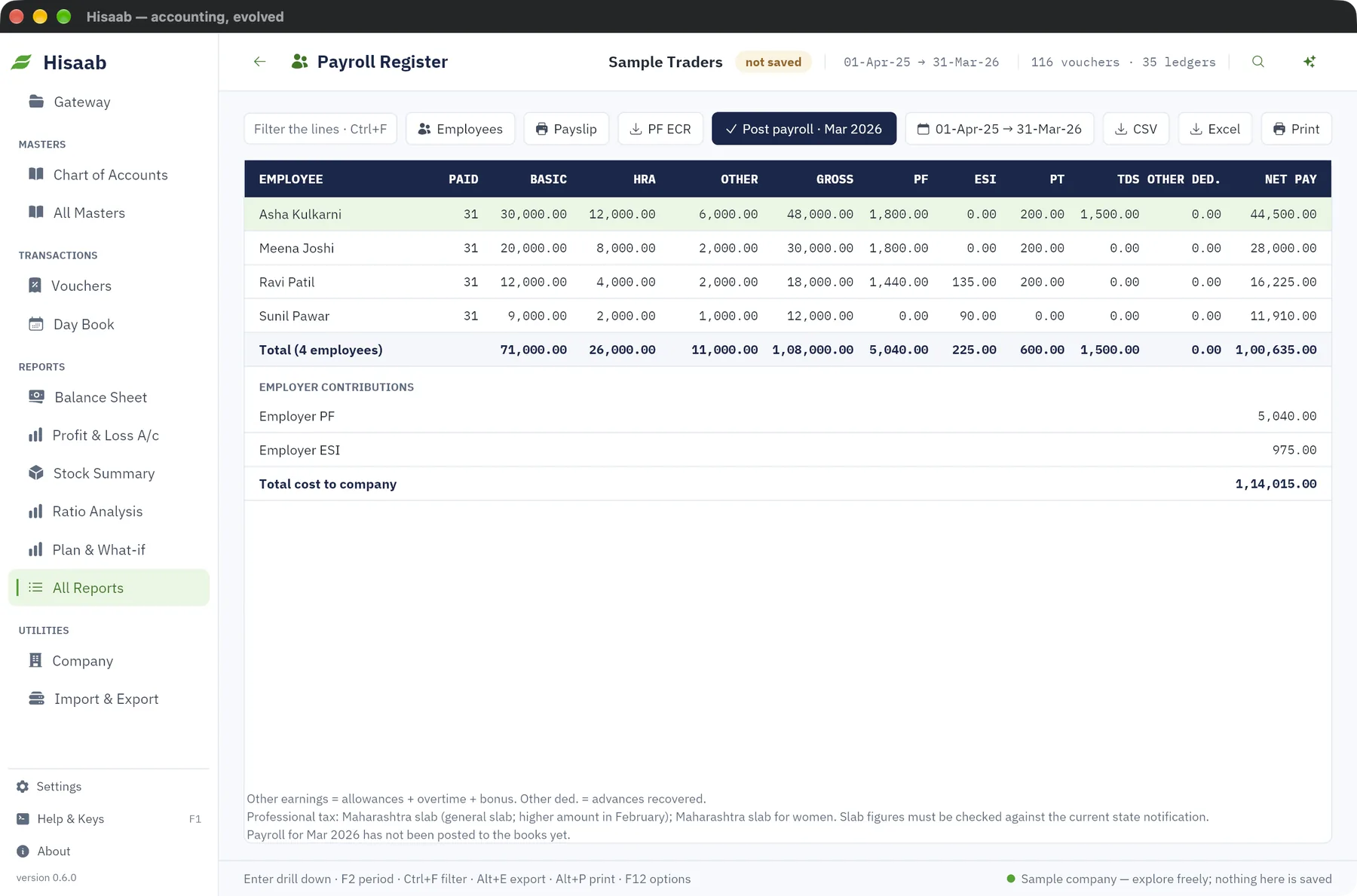
- Open All Reports, then Payroll Register.
- Press F2 and set the period to end in the month you are paying.
- Check each line.
- Click Post payroll.
For a payslip, select the employee's line and click Payslip.
How the figures are worked out#
| Item | Calculation as built into Hisaab |
|---|---|
| Earnings | Basic, HRA and allowances × paid days ÷ days in the month. Overtime and bonus are added in full. |
| PF | 12% employee and 12% employer, on basic up to the wage ceiling, each rounded to the nearest rupee. Ceiling: ₹15,000 for months up to August 2026, ₹19,667 for September 2026, ₹25,000 from October 2026. |
| ESI | 0.75% employee and 3.25% employer on gross pay, each rounded up to the next rupee. Applies only when the month's gross is ₹21,000 or less. |
| Professional tax | By the slab of the employee's state, or the company's state if blank. |
| Income tax (TDS) | The monthly amount typed on the employee. It is not calculated. |
Slabs are built in for Maharashtra, Karnataka, West Bengal, Tamil Nadu (Greater Chennai rates), Gujarat, Andhra Pradesh, Telangana, Madhya Pradesh and Punjab. Nothing is deducted for Delhi, Haryana, Uttar Pradesh, Rajasthan, Uttarakhand, Himachal Pradesh, Chandigarh, Jammu and Kashmir, Ladakh, Goa, Arunachal Pradesh, and Odisha from April 2026. Any other state uses the flat amount in Payroll Settings (₹200 a month by default).
Careful: Rates, ceilings and state slabs change by notification. Confirm the current figures with your consultant. You can override them in Payroll Settings, in a record named Default.
The payroll voucher#
Posting creates one Journal dated the last day of the month. It debits Salaries with total gross and the employer contribution ledger, and credits Salary Payable with net pay and the PF, ESI, professional tax and TDS payable ledgers.
A month can be posted once. To post again after a correction, cancel the payroll voucher first. Posting is refused if a ledger is missing or deductions exceed an employee's gross pay.
PF ECR file#
In the Payroll Register, click PF ECR. A text file with one line per PF employee is saved; the status bar shows where. Check it on the EPFO portal before filing, including the field order.
Limits#
- EDLI and PF administrative charges are not calculated or posted.
- ESI stops the month gross crosses ₹21,000, not at the end of the contribution period.
- No income tax computation, Form 16, gratuity or leave balances.
Next#
Something here wrong or missing? Open a ticket and mention this page.