
Close the year, start the next
Finish the year's entries, save the final accounts, lock the year, keep a backup aside and carry on in the same company from 1 April.
This guide is for the person who finalises the books on 31 March. At the end you will have the year's Trial Balance, Profit & Loss and Balance Sheet saved, the year locked against changes, a backup kept away from the computer, and the new year running. Allow half a day, most of it for the stock count.
Before you start#
- Every month of the year is closed. See Close the month.
- The bank is reconciled up to 31 March. See Reconcile a bank account.
- You are signed in as an Admin. Only an Admin can set the period lock.
- You have the physical stock count sheet for 31 March.
How Hisaab treats a year#
Hisaab has no year-closing command, and you do not create a new company for the new year. A company is one continuous set of books. You choose which year to see with the period (F2).
- Income and expense ledgers start from zero in every period you choose.
- Assets, liabilities and party balances carry forward on their own.
- Profit of earlier years shows on the Balance Sheet under Profit & Loss A/c, on a line named Opening balance. The year on screen is on the line Current period.
- Closing stock is not an entry. It is the weighted-average value of the Stock Summary, and it becomes the next year's opening stock.
The example below is Sample Traders closing the year 1-Apr-2025 to 31-Mar-2026.
Stage 1: Correct the stock to the count#
- Click Stock Summary in the sidebar and press F2. Set From
1-4-2025and To31-3-2026, then click Apply. - Compare each Closing Qty with the count sheet.
- For each item that differs, press Ctrl+F7 for a Physical Stock voucher.
- Type the Date
31-3-2026, the Item and the counted quantity in Qty. Press Ctrl+S.
Example: the books show 142 pcs of Steel Lunch Box and the count is 140. The Physical Stock voucher sets the quantity to 140 and keeps the average rate of ₹240. Closing stock falls by 2 × ₹240 = ₹480.
Check: Stock Summary shows the counted quantity for every item and no item is highlighted for negative stock.
Stage 2: Post depreciation and outstanding expenses#
Hisaab does not calculate depreciation. You post it as a Journal. Confirm the rates with your chartered accountant.
- Press F7 and type the Date
31-3-2026. - In Ledger type
Depreciationand type20000under Debit. If the ledger does not exist, press Alt+C in that field, create it under Indirect Expenses, and you return to the voucher. - Click add line, type
Furniture & Fixturesand20000under Credit. - Type a Narration and press Ctrl+S.
The arithmetic: Furniture & Fixtures ₹2,00,000 × 10% = ₹20,000.
Post bills that belong to March but are not yet paid in the same way. For a March electricity bill of ₹3,600: Dr Electricity ₹3,600, Cr Outstanding Expenses ₹3,600 (a ledger under Provisions).
Check: each voucher shows balanced before you save, and the Day Book for 31-Mar-2026 lists the Journals.
Stage 3: Read and save the final accounts#
- Press Ctrl+K, type
trialand press Enter. Keep the period at 1-Apr-2025 to 31-Mar-2026. - Open Profit & Loss A/c and Balance Sheet from the sidebar. Open Balance Sheet Schedule III and Cash Flow from All Reports if your accountant wants them.
- On each report click CSV or Excel for a file, or press Ctrl+P and choose "Save as PDF" in the browser. Do the same for Stock Summary, Bills Receivable and Bills Payable.
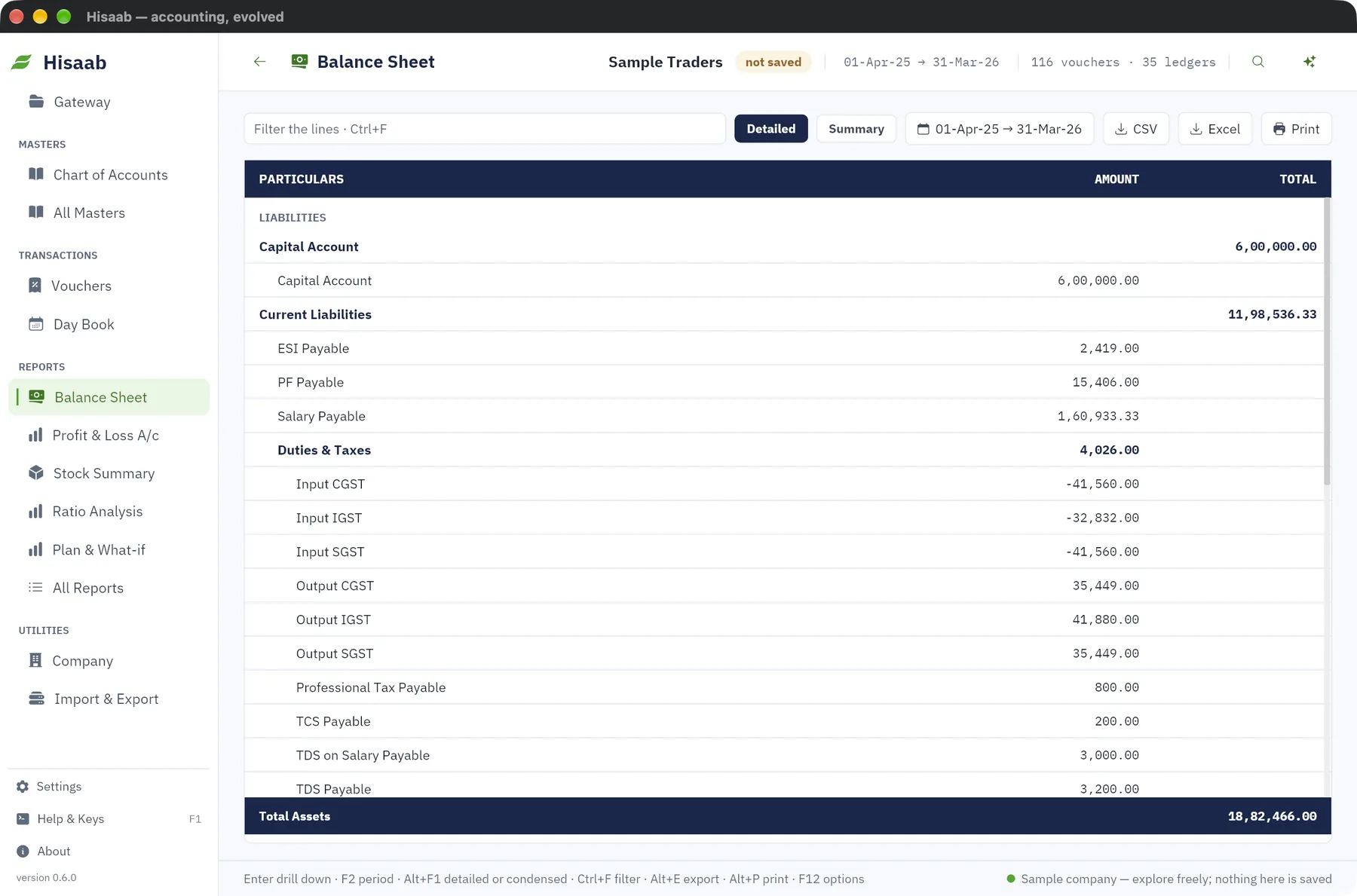
In the example, net profit before the three entries was ₹4,18,500. After them it is ₹4,18,500 − ₹20,000 − ₹480 − ₹3,600 = ₹3,94,420.
Check: on the Trial Balance, Debit and Credit totals are equal and there is no row named Difference in opening balances. On the Balance Sheet, Total Liabilities equals Total Assets, and Current period equals the net profit on Profit & Loss.
Note: Hisaab does not post a transfer of the year's profit to Capital Account. The profit stays under Profit & Loss A/c. Ask your accountant how the signed accounts should show it.
Stage 4: Lock the year#
- Press F3 to open Company.
- In Lock books until (period lock) type
31-3-2026. - Click Save settings · Ctrl+S.
Check: open any March voucher and click Alter. The form shows "books are locked up to 31-Mar-26" and the save is refused.
Careful: The lock stops vouchers being added, altered, cancelled or deleted, and it stops payroll being posted into the locked period. It does not stop a file import, a change to a bank date, or a change to a ledger's opening balance. Tell your staff not to import into a closed year.
Stage 5: Keep a year-end backup aside#
- Click Settings, then Open on the Backups row, then Back up now.
- Click Import & Export, then Everything as JSON. The file goes to the
exportsfolder. - Close Hisaab. Copy the whole company folder to a pen drive or another disk and label it with the year. The folder path is printed on the Company screen.
Check: the copy on the other disk contains journal.log and a backups folder with today's date.
A backup taken with Back up now is marked "By hand" and is not removed automatically, but it sits on the same disk as the books. A cloud server keeps only its newest backups. The copy on another disk is the one to rely on.
Stage 6: Start the new year#
There is nothing to switch on. Enter the first voucher dated 1-Apr-2026.
- Numbers continue. Voucher numbers do not restart on 1 April. If the last invoice was
INV-96, the next isINV-97. For a fresh series, open All Masters, then Cost Centres & Voucher Types, type a Name and a Number prefix such as26-27/, click Sales and click Add type. The new type is in the list of all types: press F10 on the voucher form. - The period widens. Once the new year has a voucher, the company opens with a period that runs from your first voucher to 31-Mar-2027. Press F2 and click This year before you read Profit & Loss, or it adds both years together.
- Financial year from on the Company screen does not need changing.
Check: with the period on This year, the Trial Balance has a row Profit & Loss A/c (brought forward), and each Opening Qty in Stock Summary equals last year's Closing Qty.
If something is off#
- "Difference in opening balances" on the Trial Balance. A ledger opening is missing or on the wrong side. See Enter opening balances.
- Profit looks doubled. The period covers two years. Press F2 and click This year or Last year.
- A late entry for March is refused. An Admin clears Lock books until (period lock), the entry is made, and the Admin types the date back. Save the final reports again.
- Closing stock is wrong. Open Item Movement for the item and look for a missing purchase, or a Physical Stock voucher with the wrong date.
- "number is already used in 2025-26". Leave Number blank so Hisaab gives the next free number.
Where to go next#
Something here wrong or missing? Open a ticket and mention this page.