
A payroll month, start to finish
Set up employees, check the month's salary sheet with PF, ESI and professional tax, post it, pay salaries and statutory dues, and save the PF file.
This guide is for whoever runs salaries. At the end, one month's payroll will be checked, posted, paid, and its statutory dues cleared by payment vouchers. The first month takes about an hour. Later months take fifteen minutes.
Careful: PF, ESI and professional tax rates, ceilings and slabs change by notification. Confirm the figures with your consultant before the first run and after any change in law.
Before you start#
- These ledgers exist:
Salaries,Employer PF & ESI Contribution,Salary Payable,PF Payable,ESI Payable,Professional Tax PayableandTDS on Salary Payable. The set-up creates them if you switched on I pay salaries (payroll). Otherwise create them by hand. See Run payroll. - You are signed in as Accountant or Admin.
The example#
Sample Traders, Maharashtra, June 2025, with the four employees of the sample company: Asha Kulkarni (basic ₹30,000, gross ₹48,000), Ravi Patil (₹12,000, ₹18,000), Meena Joshi (₹20,000, ₹30,000) and Sunil Pawar (₹9,000, ₹12,000). Gross is basic plus HRA and other allowances. Nobody has leave without pay.
Stage 1: Enter employees and their salary structure#
- Open All Masters, then Employees, and click New.
- Type the Employee name, Date of joining and Basic pay per month. Put basic plus dearness allowance here, because PF is worked on it.
- Fill HRA per month and Other allowances per month.
- Choose Yes or No for Provident fund applies, ESI applies and Professional tax applies.
- Fill Income tax (TDS) per month if you deduct it. Hisaab does not calculate income tax.
- Fill State of employment, Gender and UAN. Maharashtra's professional tax differs for women, and the PF file needs the UAN.
- Press Ctrl+S.
To override the built-in rates, ceilings or ledgers, add a record named Default under All Masters, Payroll Settings.
Check: the Employees list shows every person on the rolls with the right joining date.
Stage 2: Record the month's changes#
- Open All Masters, then Attendance & Pay Adjustments, and click New.
- Pick the Employee and type any date of the month in Month.
- Fill Loss-of-pay days, Overtime, Bonus or Advance recovered. Save.
Check: one record for each employee with a change, dated inside the month. In a month with no changes there are none.
Stage 3: Read the Payroll Register#
- Open All Reports, then Payroll Register.
- Press F2 and set To to
30-6-2025. The register works out the month that holds the To date.
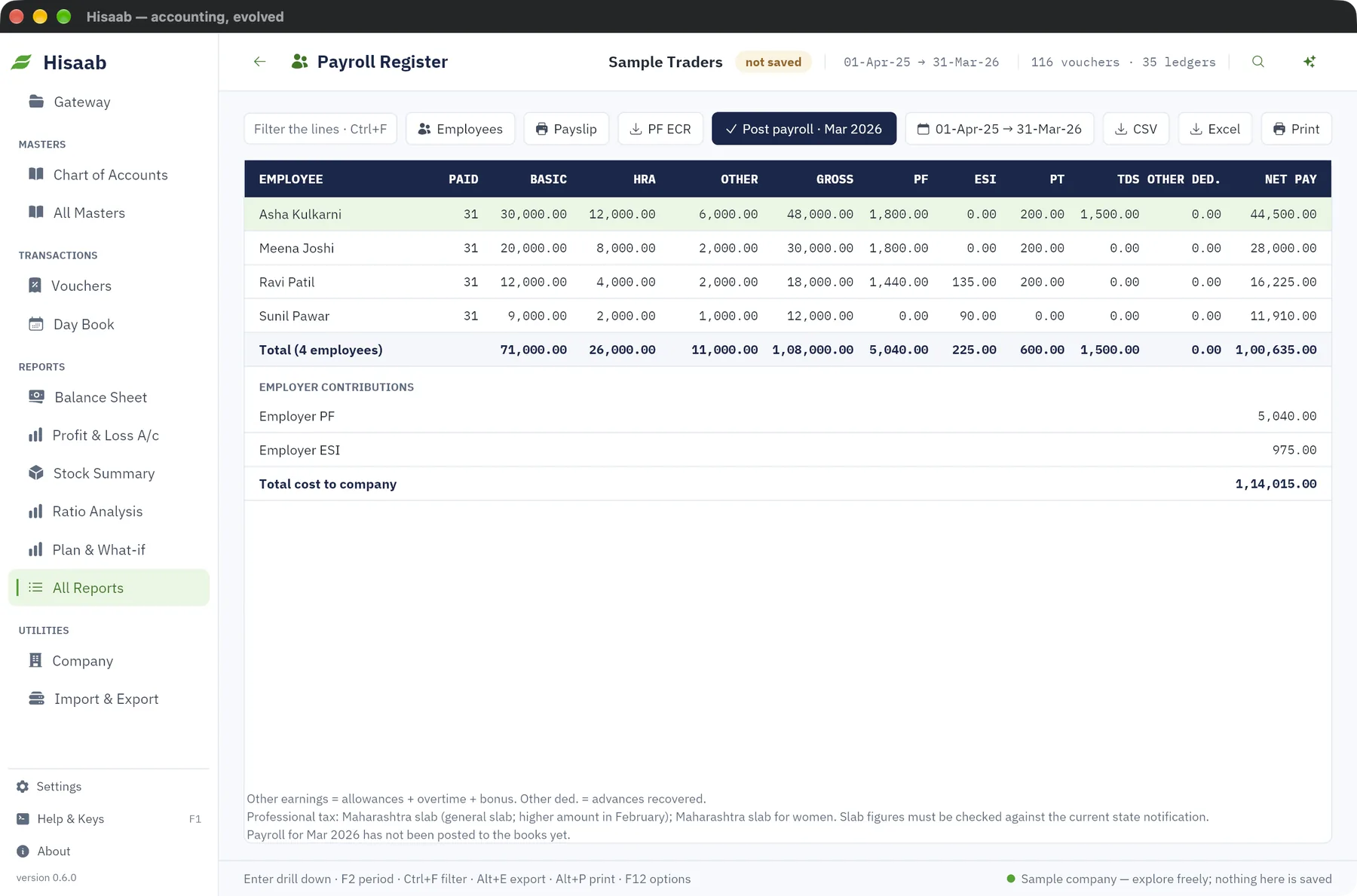
| Employee | Gross | PF | ESI | PT | TDS | Net pay |
|---|---|---|---|---|---|---|
| Asha Kulkarni | ₹48,000 | ₹1,800 | ₹200 | ₹1,500 | ₹44,500 | |
| Ravi Patil | ₹18,000 | ₹1,440 | ₹135 | ₹200 | ₹16,225 | |
| Meena Joshi | ₹30,000 | ₹1,800 | ₹200 | ₹28,000 | ||
| Sunil Pawar | ₹12,000 | ₹90 | ₹11,910 | |||
| Total | ₹1,08,000 | ₹5,040 | ₹225 | ₹600 | ₹1,500 | ₹1,00,635 |
Below these lines the register shows Employer PF ₹5,040, Employer ESI ₹975 and the cost to company: ₹1,08,000 + ₹6,015 = ₹1,14,015.
Check: total gross less total deductions equals total net pay: ₹1,08,000 − ₹5,040 − ₹225 − ₹600 − ₹1,500 = ₹1,00,635.
Stage 4: Check PF, ESI and professional tax#
Work one or two lines by hand before you post.
- PF. 12% of basic, up to the wage ceiling, from employee and employer alike. The built-in ceiling for June 2025 is ₹15,000. Asha: 12% of ₹15,000 = ₹1,800. Ravi: 12% of ₹12,000 = ₹1,440.
- ESI. 0.75% from the employee and 3.25% from the employer, on gross, only when the month's gross is ₹21,000 or less. Ravi: ₹18,000 × 0.75% = ₹135 and ₹18,000 × 3.25% = ₹585. Asha and Meena earn more, so nothing is deducted.
- Professional tax. The Maharashtra slab gives ₹200 a month here, and ₹300 in February. Sunil's record has PF and professional tax switched off.
- Income tax. The ₹1,500 is the amount typed on Asha's record.
Check: your hand figures equal the register. If a rate is out of date, change it in Payroll Settings and open the register again.
Stage 5: Post the payroll#
- In the Payroll Register, click Post payroll. The button names the month.
- The status bar confirms the Journal number and the amount.
One Journal dated 30-Jun-2025 is created:
- Dr Salaries ₹1,08,000 and Employer PF & ESI Contribution ₹6,015.
- Cr Salary Payable ₹1,00,635, PF Payable ₹10,080 (₹5,040 + ₹5,040), ESI Payable ₹1,200 (₹225 + ₹975), Professional Tax Payable ₹600 and TDS on Salary Payable ₹1,500.
Each side totals ₹1,14,015.
For a payslip, select the employee's line and click Payslip. It opens in your browser, one employee at a time.
Check: press F10. The Day Book shows the Journal on the last day of the month, for ₹1,14,015.
Stage 6: Pay the salaries#
Hisaab has no salary transfer file and no pay button. Enter the payment yourself.
- Press F5 and type the date the bank was debited. A Payment opens in Single Entry mode.
- Type
HDFC Bankin Account. This is the account the money is paid from. - Under Particulars type
Salary Payableand100635in Amount. - Type the bank's reference in Reference and press Ctrl+S.
If the bank shows one debit per employee, enter one Payment per employee, so each matches a statement line.
Check: the Ledger report for Salary Payable shows a nil balance.
Stage 7: Pay the statutory dues#
Each due is an ordinary Payment voucher (F5) on the day you pay the challan, with HDFC Bank credited:
- Dr PF Payable ₹10,080.
- Dr ESI Payable ₹1,200.
- Dr Professional Tax Payable ₹600.
- Dr TDS on Salary Payable ₹1,500.
The PF challan also carries EDLI and administrative charges. Hisaab does not calculate or post them. Add them to the PF payment as a debit to an expense ledger.
Check: on the Trial Balance, the four payable ledgers show no balance once all challans are paid.
Stage 8: Save the PF file and the registers#
- In the Payroll Register, click PF ECR. A text file with one line per PF employee is saved in the
exportsfolder. The status bar shows the path. - Check the file on the EPFO portal before filing, including the order of the fields.
- Click CSV or Print to keep the register. Salary Statement gives employee-wise totals for a longer period.
There is no ESI return file, professional tax return, Form 16 or quarterly TDS file for salaries. Prepare those outside Hisaab.
Check: the ECR file has three lines in the example, one for each employee with PF.
If something is off#
- "ledger '…' does not exist". A posting ledger is missing. Create it under the group named in the message, or choose another ledger in Payroll Settings, and post again.
- "payroll for Jun 2025 is already posted". A month posts once. Open the payroll Journal, click Cancel voucher, correct the record and post again. See Change, cancel or delete a voucher.
- "deductions exceed gross pay". Reduce the income tax or the advance recovered for that employee.
- Professional tax is wrong or nil. Check State of employment and Gender on the employee. A state with no built-in slab uses the flat amount in Payroll Settings.
Where to go next#
Something here wrong or missing? Open a ticket and mention this page.