
Move from your previous software
Pick a cut-off date, bring masters and vouchers across, agree the Trial Balance, dues and stock with the old system, and run both side by side before you switch.
This guide is for a business that keeps books in other software and wants to continue in Hisaab. At the end, your masters, vouchers and opening balances will be in Hisaab and agreed with the old system to the rupee. The import takes an hour or two. Plan one month of running both.
Before you start#
- Hisaab is installed. See Install Hisaab.
- Your previous software still opens and can export XML.
- You have Accountant or Admin access in Hisaab, or the company has no users yet.
Stage 1: Choose the cut-off date#
The cut-off date is the last day whose entries you bring from the old system.
| Choice | What you import | Result |
|---|---|---|
| Books begin on 1 April | Masters with opening balances, then every voucher from 1 April to the cut-off | The whole year is in Hisaab |
| Books begin after the cut-off | Closing balances at the cut-off, as opening balances | Faster, but Profit & Loss and GST reports start after the cut-off |
Choose the first where you can. Make the cut-off a month end, after the bank is reconciled and that month's GST return is filed.
The example moves Sample Traders with a cut-off of 30-Nov-2025 and books beginning 1-Apr-2025.
Stage 2: Take files and figures out of the old system#
- Export the masters as XML: groups, ledgers and stock items.
- Export the vouchers as XML for 1-Apr-2025 to 30-Nov-2025.
- Print or save, as at 30-Nov-2025: the Trial Balance, party-wise receivables and payables, and the stock summary with quantities and values.
Check: you have two XML files and four reports, all for the same dates.
Stage 3: Create the company#
- On the welcome screen click Move my books from another package. If a company is already open, press F3 and click Set up a new company.
- Type the Company name and GSTIN. Set Books begin on to
1-4-2025. Click Continue. - Choose the kind of business and the GST and payroll switches.
- Leave Balance in bank and Cash in hand blank. Your openings come from the old system.
- Click Create company. Import & Export opens.
Check: the top bar shows your company name without a not saved label.
Stage 4: Import masters, then vouchers#
- Drop the masters XML file on the window. It is imported straight away.
- Read the status bar, for example
masters.xml: 42 added, 6 already present. - Drop the vouchers XML file. The status bar counts the vouchers added.
Masters go first. A voucher that names a ledger not yet in the books creates it, in a group guessed from its name. Dropping the same file again never duplicates.
Tip: If your previous software can answer XML requests on your network, the Pull Day Book button on the same screen fetches the current period without a file.
Check: the status bar reports how many records each file added, and none skipped.
Stage 5: Fill what the XML did not bring#
| Missing after an XML import | How to fill it |
|---|---|
| Openings on ledgers the set-up had already made, such as Cash and Capital Account | Such a ledger is counted as "already present" and keeps its opening. Alter it, or import a sheet |
| Ledger address | Click Ledgers (CSV), fill the Address column and drop the file back. Only the columns in the sheet change |
| Phone, e-mail, bank details, credit limit | Type them on each party ledger |
| GST rate on stock items | Click Stock items (CSV), fill GST% and drop the file back |
| Company address, PAN, phone | Company screen (F3) |
For the second choice in stage 1, skip the vouchers file and put the closing balances in the Opening Balance and Dr/Cr columns of the ledgers sheet. See Enter opening balances.
Check: open All Reports, then Data Health. The Opening balances line reads "debits equal credits".
Stage 6: Agree with the old system#
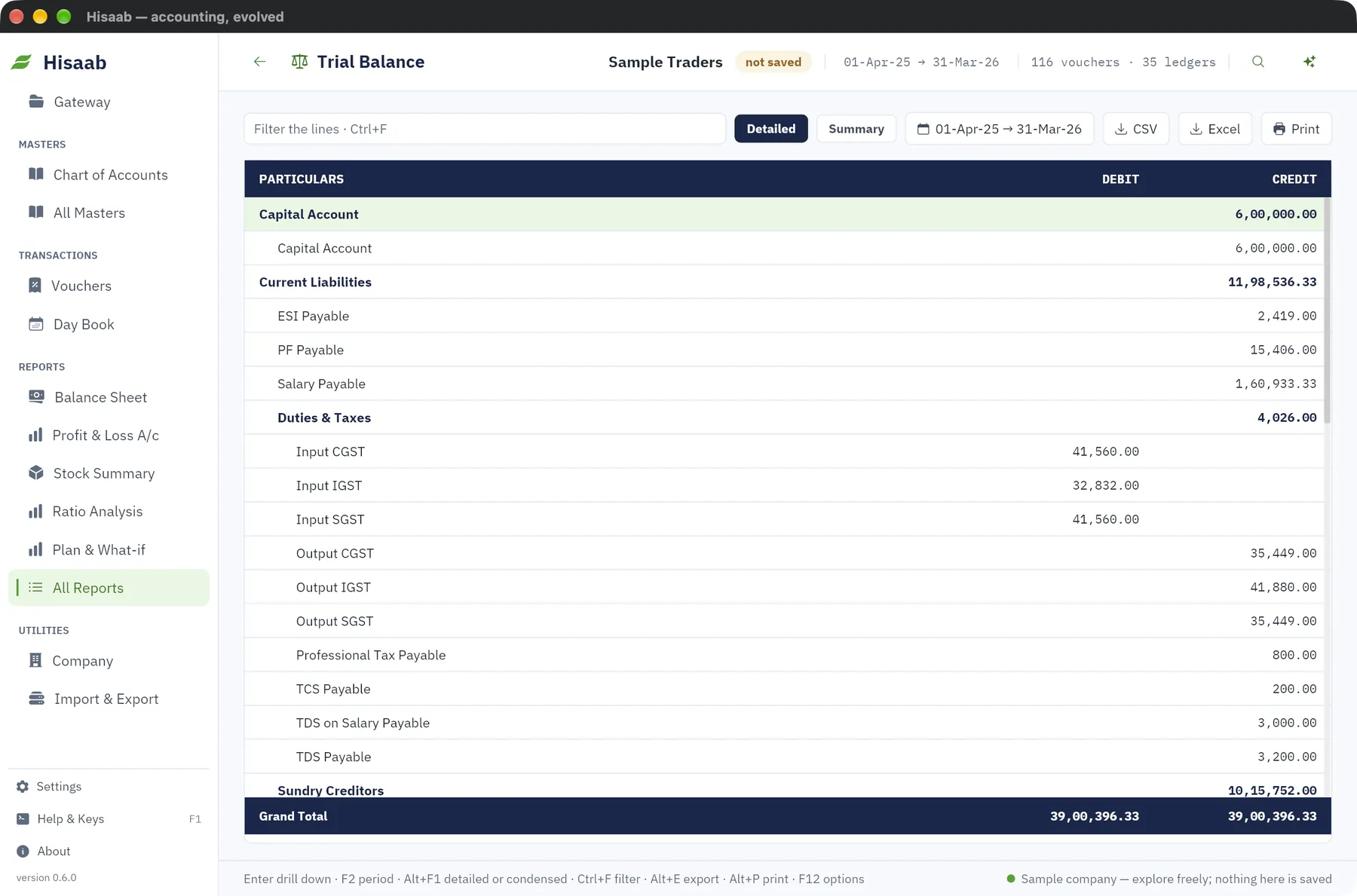
Press F2 on any report and set the period 1-4-2025 to 30-11-2025.
| Compare | In Hisaab | Example |
|---|---|---|
| Trial Balance | Ctrl+K, trial |
₹14,82,650 on each side in both systems |
| Receivables | Bills Receivable | Nova Retail ₹1,47,266 + Zen Stores ₹38,940 = ₹1,86,206, the old debtors total |
| Payables | Bills Payable | Each supplier's total equals the old list |
| Stock | Stock Summary | Each item's quantity equals the old stock summary |
Work from the top. If the Trial Balance differs, press Enter on a group, then on a ledger, to reach the vouchers.
Three differences are expected:
- Stock value. Hisaab values stock at weighted-average cost only. If the old system used another method, quantities agree but values may not.
- Bill detail. A party's opening balance is one bill named "Opening balance". Due dates are not imported. They come from Credit period (days) on the ledger.
- Opening stock. The opening check counts ledgers only. If the difference equals your opening stock value, create a ledger under Stock-in-Hand, for example
Opening Stock, with a Dr opening of that value.
Check: Trial Balance totals equal the old system's, with no row named Difference in opening balances. Debtors, creditors and stock quantities agree party by party and item by item.
Stage 7: Run both for a period#
- For one month, enter each day's vouchers in both systems.
- At the month end, compare the Trial Balance, the bank balance and the GSTR-1 totals of the two.
- When they agree, stop entering in the old system. Keep its data and a final backup. Past years stay there.
- In Hisaab, press F3, type the cut-off date in Lock books until (period lock) and click Save settings · Ctrl+S. The imported months can no longer be altered by mistake. The lock does not stop another import.
Check: two month-end Trial Balances that agree, one from each system.
What does not come across#
- Users and passwords. Add them again. See Add users and set roles.
- Budgets, price lists, bills of materials, employees and payroll history.
- Invoice layouts. Fill Invoice Print Settings under All Masters.
- More than one cost centre on a voucher line.
- Opening stock by godown or batch. It is one quantity and one value per item.
- Stock groups. Items are one flat list.
If something is off#
- "This file is not XML". Export again as XML, or use a CSV or Excel sheet. See Fix common problems.
- A ledger is in the wrong group. It was created by a voucher before the masters were imported. Alter the ledger and correct Under group. Data Health lists unclassified ledgers.
- "Difference from unbalanced vouchers" on the Trial Balance. An imported voucher does not balance. Data Health names it. Correct it after checking the old system.
- The row "Difference in opening balances". Check Cash, Capital Account and other ledgers the set-up made, creditors typed as Dr, and opening stock as above.
Where to go next#
Something here wrong or missing? Open a ticket and mention this page.